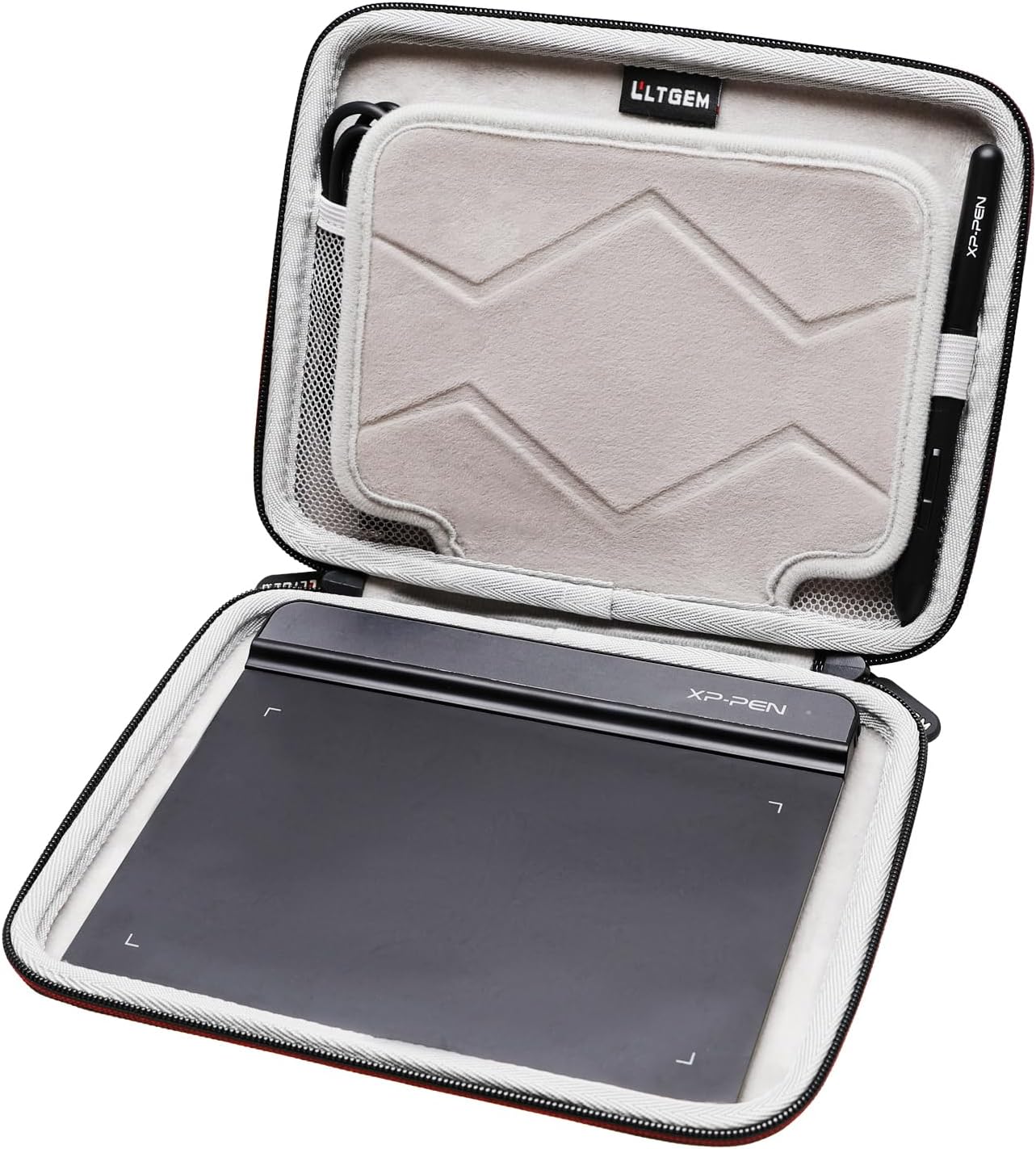
If you work with a drawing tablet — a pressure-sensitive pad or screen that artists and designers use to sketch, illustrate, or retouch photos with a stylus pen rather than a mouse — you already know how dependent your workflow is on that single piece of hardware. A cracked corner, a gouged surface, or a bent USB-C port can sideline a project entirely. Carrying cases for drawing tablets are the unsexy purchase that prevents that exact problem: they’re purpose-fit sleeves, pouches, or hard shells sized for the tablet’s body, protecting the drawing surface and the nibs (the small replaceable tips on the stylus pen) while you commute, travel, or pack for a client site. This guide focuses specifically on brands Wacom, XP-Pen, and Huion — the three dominant names in the dedicated drawing-tablet market as of mid-2026 — and cuts through the noise to help you spend correctly, not just spend.
Here’s the honest version of the research: most of the internet’s case recommendations conflate “sleeve that fits” with “sleeve that protects,” which are meaningfully different criteria depending on how you move with your gear. What follows is a framework, a set of named tradeoffs, and clear “if X, then Y” rules.
Why Drawing Tablet Cases Are a Different Problem Than Laptop Bags
A laptop has a rigid aluminum or polycarbonate shell doing most of the structural work before the bag even contributes. A pen tablet like the Wacom Intuos Pro, XP-Pen Deco Pro, or Huion Kamvas 13 does not. The drawing surface on a screenless pen tablet is a thin composite membrane stretched over a sensor grid — it’s engineered to flex slightly under pen pressure, which means it’s also susceptible to point loading (a corner impact, a stylus rolling under the tablet in a bag) in ways a laptop lid simply isn’t.
Display tablets — screen-based drawing tablets where the artist draws directly on a glass surface, like the Wacom Cintiq 16, Huion Kamvas Pro 16, or XP-Pen Artist 16 — are a harder problem still. You now have a glass panel that’s essentially unprotected if the case doesn’t provide perimeter foam and back-panel rigidity. Creative Bloq’s coverage of drawing tablet workflows consistently notes that display tablet users who commute regularly treat screen protection as a non-negotiable, whereas screenless-tablet users are somewhat more forgiving in their carry choices because the sensor film is more resilient than glass.
PCMag’s drawing tablet roundups make a related point: the accessories ecosystem around Wacom is more mature simply because Wacom has been in market longer, meaning you’ll find Wacom-branded sleeves at most retailers. XP-Pen and Huion users are working with a less curated first-party accessory market as of mid-2026, which shifts the purchase logic toward universal sizing rather than brand-matched cases.
The core tradeoff framework:
| Use case | Risk profile | Case type needed |
|---|---|---|
| Studio desk only, rare transport | Low | Basic neoprene sleeve |
| Daily commute, backpack | Medium | Padded folio or semi-rigid sleeve |
| Air travel, field work, client visits | High | Hard shell or padded hard-case insert |
| Display tablet (glass screen) | Always high | Rigid back + screen film + padded case |
Sizing: Getting This Wrong Costs You Twice
The most common mistake, confirmed by aggregated buyer reviews across major retail platforms, is buying a case by “tablet size name” rather than by millimeter dimensions. “Medium” means something different to every manufacturer. A Wacom Intuos Pro Medium (338 × 219 mm) is not the same footprint as a Huion Inspiroy 2 Medium (278 × 175 mm), and a sleeve sized for the former will let the latter rattle around with enough travel to damage the stylus nibs stored alongside it.
By the numbers — measure before you buy:
- Wacom Intuos Pro Small: 200 × 160 mm active area; full body ~270 × 214 mm
- XP-Pen Deco Pro Small Gen 2: active area 160 × 100 mm; full body ~270 × 180 mm
- Huion Kamvas 13 (display tablet): full body ~371 × 232 mm — closer to a 13” laptop than a “small” anything
- Wacom Cintiq 16: full body ~422 × 274 mm — needs a 16” laptop sleeve at minimum
TechRadar’s drawing tablet guide reinforces this: users who treat display tablets as “big tablets” and buy iPad sleeves frequently find they’ve under-protected the corners and the cable management area near the ports. Measure the actual device body, add 10–15 mm of clearance on each side for foam thickness, and shop that number.
What to Look For (and What’s Marketing Noise)
Padding density, not just padding presence. Sleeve listings almost universally claim to be “padded,” but the functional difference between 3 mm of thin foam and 10 mm of closed-cell EVA foam is significant for impact absorption. Wirecutter’s accessories coverage notes that closed-cell EVA foam — the same dense material used in tool cases — is the correct material for hard-corner impact protection; open-cell foam compresses easily and doesn’t recover. For screenless tablets in a padded backpack, thin neoprene is genuinely adequate. For display tablets in checked luggage or a messenger bag with books and chargers, you want EVA.
Interior organization for nibs and the stylus. A nib is tiny — roughly the size of a pencil eraser — and Wacom, XP-Pen, and Huion all ship replacement nib sets that are easy to lose. Cases with a secondary zippered inner pocket or a molded nib-holder pocket earn their extra cost for active users. The Wacom Intuos stylus (specifically the Pro Pen 2 and Pro Pen 3) is also fragile at the tip when stored loose; a dedicated pen loop or clip slot is worth prioritizing.
Water resistance versus waterproofing. Water-resistant cases (typically neoprene or coated polyester) handle light rain and bag-condensation scenarios. Waterproof cases (sealed zippers, PU-coated fabric, or hard plastic shells) handle downpours and spills. For most illustrators commuting in cities, water-resistant is sufficient and meaningfully cheaper. If you’re doing field work — site visits, outdoor events — step up to waterproof.
What’s mostly marketing: thread count claims on fabric linings, brand logo embossing, and “military grade” language without an MIL-SPEC number attached to a specific drop test. Across aggregated reviews, owners consistently report that brand-name neoprene sleeves from well-known accessory makers perform similarly to generic equivalents at the same foam density; you’re paying for fit consistency and the warranty, not material superiority.
Case Categories by Budget and Use Case
Neoprene sleeve, $10–$25 (studio/occasional transport use)
For artists who primarily work at a desk and transport their tablet a few times a month in a padded backpack, a 3–5 mm neoprene sleeve sized correctly is the right call. The math is straightforward: at this price tier, you’re buying corner protection and surface scratch prevention, not impact absorption. Owners report that branded Wacom neoprene sleeves fit their respective tablets precisely — no rattling, clean zip — while universal options require careful measurement but work equally well once sized correctly. XP-Pen and Huion do not consistently offer first-party sleeves in all markets as of mid-2026, so universal sizing is the default path for those brands.
Padded folio / semi-rigid sleeve, $25–$60 (daily commute)
This is the sweet spot for most working illustrators. A semi-rigid sleeve — neoprene or polyester exterior with a firmer interior panel, typically 8–12 mm total wall thickness — handles backpack carry with mixed contents (laptop, chargers, books) without catastrophic point loading on the tablet surface. Look for cases in this range with an accessory pocket large enough to hold the stylus without bending it. For Huion Kamvas display tablets in the 13”–16” range, the 13” laptop sleeve category yields strong size matches; reviewers at Creative Bloq consistently flag this cross-category shopping strategy as the most cost-efficient path for Kamvas owners.
Hard shell / EVA case, $40–$90 (travel, client visits, display tablets)
If you’re traveling by air, carrying a Cintiq or Kamvas Pro to client sites, or your bag’s contents include anything that could drive a point into the tablet, a hard-shell case is the correct answer. EVA hard cases in the drawing tablet space are often sold as “carrying cases” by XP-Pen and Huion directly; Wacom offers hard-shell options for the Cintiq line. Owners of XP-Pen Artist display tablets report that the brand’s own hard cases fit the specific port cutouts and corner geometry well — this is a situation where first-party is worth the slight price premium because third-party cases sometimes block the USB-C ports with misaligned cutouts.
Insert-style protection for existing bags, $15–$35
If you already carry a quality messenger bag or backpack and don’t want a dedicated case, a padded insert — essentially a padded sleeve without a dedicated carry handle — slots into your existing bag. This approach works well for screenless tablets (Intuos, Deco, Inspiroy) where the risk profile is lower. It’s a harder sell for display tablets, where corner rigidity matters more than the insert category typically provides.
The Decision Rule
The “if X, then Y” version of everything above:
If you own a screenless pen tablet (Wacom Intuos, Huion Inspiroy, XP-Pen Deco) and commute daily by transit or car: buy a semi-rigid padded sleeve in the $25–$45 range, sized to the device’s actual body dimensions with 10–15 mm clearance. Skip the neoprene-only tier; your tablet shares the bag with too many hard objects.
If you own a display tablet (Cintiq, Kamvas, XP-Pen Artist) in any size: start at the hard-shell or EVA case tier. The glass surface makes the cheaper tiers a false economy. Budget $50–$80 and check whether the brand’s first-party case covers your specific model — port cutout fit matters.
If you travel by air more than twice a year with your tablet: hard shell minimum, and consider a secondary nib storage solution inside it. Pressure changes and handler impact are in a different damage category than daily commute bumps.
If you’re on a tight budget and own a screenless tablet: a well-fitted neoprene sleeve does protect adequately for low-frequency transport. The risk you’re accepting is corner impact in a crowded bag — mitigate it by keeping the tablet as the last item loaded, nearest the padded back panel of the bag.
The case market for drawing tablets in mid-2026 is genuinely fragmented, but the underlying logic is simple: match protection tier to actual risk, measure before you buy, and don’t pay for features you’ll never stress. Your tablet earns back the price of a good case in the first month you don’t have to replace it.